Home

V’Ger is a fast, encrypted, deduplicated backup tool written in Rust. It’s centered around a simple YAML config format and includes a desktop GUI and webDAV server to browse snapshots. More about design goals.
⚠️ Don’t use for production backups yet, but do test it along other backup tools.
Features
- Deduplication via FastCDC content-defined chunking
- Compression with LZ4 (default), Zstandard, or none
- Encryption with AES-256-GCM or ChaCha20-Poly1305 (auto-selected) and Argon2id key derivation
- Storage backends — local filesystem, S3-compatible storage, SFTP
- YAML-based configuration with multiple repositories, hooks, and command dumps
- REST server with append-only enforcement, quotas, and server-side compaction
- Built-in WebDAV and desktop GUI to browse and restore snapshots
- Rate limiting for CPU, disk I/O, and network bandwidth
Benchmarks
V’Ger achieves the best speed and throughput of any comparable backup tool, while using fewer CPU cycles.
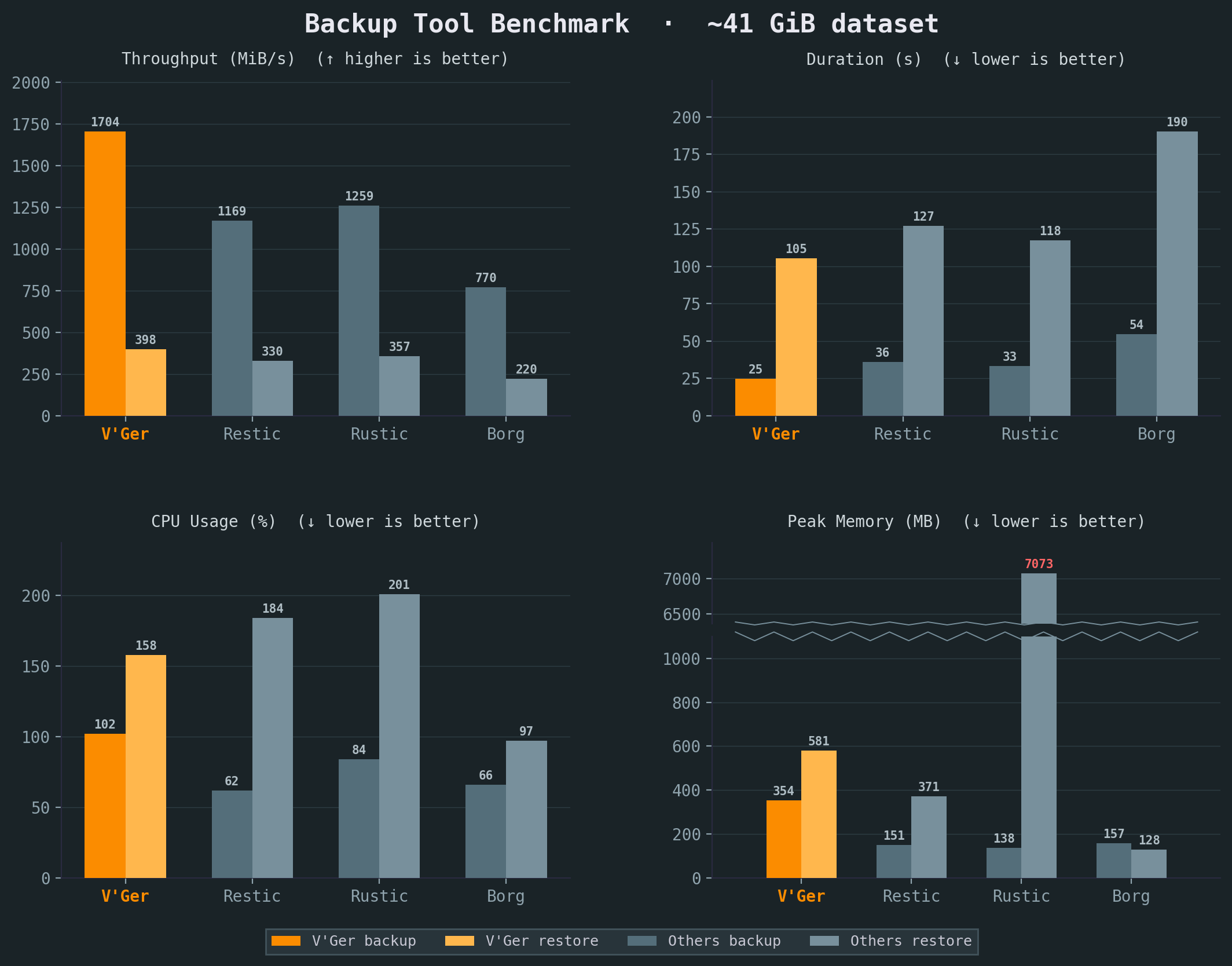
See our e2e testing skill for full benchmark details. All benchmarks were run on the same Intel i7-6700 CPU @ 3.40GHz machine with 2x Samsung PM981 NVMe. Compression and resulting repository sizes comparable. Sample corpus is a mix of files including the Linux kernel, a Wikipedia dump and an Ubuntu ISO.
Comparison
| Aspect | Borg | Restic | Rustic | V’Ger |
|---|---|---|---|---|
| Configuration | CLI (YAML via Borgmatic) | CLI (YAML via ResticProfile) | TOML config file | YAML config with env-var expansion |
| Browse snapshots | FUSE mount | FUSE mount | FUSE mount | Built-in WebDAV + web UI |
| Command dumps | Via Borgmatic (database-specific) | None | None | Native (generic command capture) |
| Hooks | Via Borgmatic | Via ResticProfile | Native | Native (per-command before/after) |
| Rate limiting | None | Upload/download bandwidth | — | CPU, disk I/O, and network bandwidth |
| Dedicated server | SSH (borg serve) | rest-server (append-only) | rustic_server | REST server with append-only, quotas, server-side compaction |
| Desktop GUI | Vorta (third-party) | Third-party (Backrest) | None | Built-in |
| Scheduling | Via Borgmatic | Via ResticProfile | External (cron/systemd) | Built-in |
| Language | Python + Cython | Go | Rust | Rust |
| Chunker | Buzhash (custom) | Rabin | Rabin (Restic-compat) | FastCDC |
| Encryption | AES-CTR+HMAC / AES-OCB / ChaCha20 | AES-256-CTR + Poly1305-AES | AES-256-CTR + Poly1305-AES | AES-256-GCM / ChaCha20-Poly1305 (auto-select at init) |
| Key derivation | PBKDF2 or Argon2id | scrypt | scrypt | Argon2id |
| Serialization | msgpack | JSON + Protocol Buffers | JSON + Protocol Buffers | msgpack |
| Storage | borgstore + SSH RPC | Local, S3, SFTP, REST, rclone | OpenDAL (local, S3, many more) | OpenDAL (local, S3, SFTP) + vger-server |
| Repo compatibility | Borg v1/v2/v3 | Restic format | Restic-compatible | Own format |
Inspired by
- BorgBackup: architecture, chunking strategy, repository concept, and overall backup pipeline.
- Borgmatic: YAML configuration approach, pipe-based database dumps.
- Rustic: storage backend abstraction via Apache OpenDAL, pack file design, and architectural references from a mature Rust backup tool.
- V’Ger from Star Trek: The Motion Picture — a probe that assimilated everything it encountered and returned as something far more powerful.
Usage
- Installing
- Initialize and Set Up a Repository
- Storage Backends
- Make a Backup
- Restore a Backup
- Maintenance
Reference
Quick Start
Install
Run the install script:
curl -fsSL https://vger.borgbase.com/install.sh | sh
Or download a pre-built binary from the releases page. See Installing for more details.
Create a config file
Generate a starter configuration in the current directory:
vger config
Or write it to a specific path:
vger config --dest ~/.config/vger/config.yaml
On Windows, use %APPDATA%\\vger\\config.yaml (for example: vger config --dest "$env:APPDATA\\vger\\config.yaml").
Edit the generated vger.yaml to set your repository path and source directories. Encryption is enabled by default. See Configuration for a full reference.
Initialize and back up
Initialize the repository (prompts for passphrase if encrypted):
vger init
Create a backup of all configured sources:
vger backup
Inspect snapshots
List all snapshots:
vger list
List files inside a snapshot (use the hex ID from vger list):
vger snapshot list a1b2c3d4
Search for a file across recent snapshots:
vger snapshot find --name '*.txt' --since 7d
Restore
Restore files from a snapshot to a directory:
vger restore a1b2c3d4 /tmp/restored
For backup options, snapshot browsing, and maintenance tasks, see the workflow guides.
Installing
Quick install
curl -fsSL https://vger.borgbase.com/install.sh | sh
Or download the latest release for your platform from the releases page.
Pre-built binaries
Extract the archive and place the vger binary somewhere on your PATH:
# Example for Linux/macOS
tar xzf vger-*.tar.gz
sudo cp vger /usr/local/bin/
For Windows CLI releases:
Expand-Archive vger-*.zip -DestinationPath .
Move-Item .\vger.exe "$env:USERPROFILE\\bin\\vger.exe"
Add your chosen directory (for example, %USERPROFILE%\bin) to PATH if needed.
Build from source
Requires Rust 1.88 or later.
git clone https://github.com/borgbase/vger.git
cd vger
cargo build --release
The binary is at target/release/vger. Copy it to a directory on your PATH:
cp target/release/vger /usr/local/bin/
Verify installation
vger --version
Next steps
Initialize and Set Up a Repository
Generate a configuration file
Create a starter config
vger config
Or write it to a specific path:
vger config --dest ~/.config/vger/config.yaml
Encryption
Encryption is enabled by default (mode: "auto"). During init, vger benchmarks AES-256-GCM and ChaCha20-Poly1305, chooses one, and stores that concrete mode in the repository config. No config is needed unless you want to force a mode or disable encryption with mode: "none".
The passphrase is requested interactively at init time. You can also supply it via:
VGER_PASSPHRASEenvironment variablepasscommandin the config (e.g.passcommand: "pass show vger")passphrasein the config
Configure repositories and sources
Set the repository URL and the directories to back up:
repositories:
  - url: "/backup/repo"
    label: "main"

sources:
  - "/home/user/documents"
  - "/home/user/photos"
See Configuration for all available options.
Initialize the repository
vger init
This creates the repository structure at the configured URL. For encrypted repositories, you will be prompted to enter a passphrase.
Validate
Confirm the repository was created:
vger info
Run a first backup and check results:
vger backup
vger list
Next steps
Storage Backends
The repository URL in your config determines which backend is used. S3 storage is implemented via Apache OpenDAL, while SFTP uses a native russh implementation. OpenDAL could be used to add more backends in the future.
| Backend | URL example |
|---|---|
| Local filesystem | /backups/repo |
| S3 / S3-compatible | s3://bucket/prefix |
| SFTP | sftp://host/path |
| REST (vger-server) | https://host/repo |
Local filesystem
Store backups on a local or mounted disk. No extra configuration needed.
repositories:
  - url: "/backups/repo"
    label: "local"
Accepted URL formats: absolute paths (/backups/repo), relative paths (./repo), or file:///backups/repo.
S3 / S3-compatible
Store backups in Amazon S3 or any S3-compatible service (MinIO, Wasabi, Backblaze B2, etc.).
AWS S3:
repositories:
  - url: "s3://my-bucket/vger"
    label: "s3"
    region: "us-east-1"                    # Default if omitted
    # access_key_id: "AKIA..."            # Optional; uses AWS SDK defaults if omitted
    # secret_access_key: "..."
S3-compatible (custom endpoint):
When the URL host contains a dot or a port, it’s treated as a custom endpoint and the first path segment is the bucket:
repositories:
  - url: "s3://minio.local:9000/my-bucket/vger"
    label: "minio"
    region: "us-east-1"
    access_key_id: "minioadmin"
    secret_access_key: "minioadmin"
S3 configuration options
| Field | Description |
|---|---|
region | AWS region (default: us-east-1) |
access_key_id | AWS access key (falls back to AWS SDK defaults) |
secret_access_key | AWS secret key |
endpoint | Override the endpoint derived from the URL |
SFTP
Store backups on a remote server via SFTP. Uses a native russh implementation (pure Rust SSH/SFTP) — no system ssh binary required. Works on all platforms including Windows.
Host keys are verified with an OpenSSH known_hosts file. Unknown hosts use TOFU (trust-on-first-use): the first key is stored, and later key changes fail connection.
repositories:
  - url: "sftp://backup@nas.local/backups/vger"
    label: "nas"
    # sftp_key: "/home/user/.ssh/id_rsa"  # Path to private key (optional)
    # sftp_known_hosts: "/home/user/.ssh/known_hosts"  # Optional known_hosts path
    # sftp_max_connections: 4  # Optional concurrency limit (1..=32)
URL format: sftp://[user@]host[:port]/path. Default port is 22.
SFTP configuration options
| Field | Description |
|---|---|
sftp_key | Path to SSH private key (auto-detects ~/.ssh/id_ed25519, id_rsa, id_ecdsa) |
sftp_known_hosts | Path to OpenSSH known_hosts file (default: ~/.ssh/known_hosts) |
sftp_max_connections | Max concurrent SFTP connections (default: 4, clamped to 1..=32) |
REST (vger-server)
Store backups on a dedicated vger-server instance via HTTP/HTTPS. The server provides append-only enforcement, quotas, lock management, and server-side compaction.
repositories:
  - url: "https://backup.example.com/myrepo"
    label: "server"
    rest_token: "my-secret-token"          # Bearer token for authentication
REST configuration options
| Field | Description |
|---|---|
rest_token | Bearer token sent as Authorization: Bearer <token> |
See Server Mode for how to set up and configure the server.
All backends are included in the default build and in pre-built binaries from the releases page.
Make a Backup
Run a backup
Back up all configured sources to all configured repositories:
vger backup
By default, V’Ger preserves filesystem extended attributes (xattrs). Configure this globally with xattrs.enabled, and override per source in rich sources entries.
Sources and labels
In its simplest form, sources are just a list of paths:
sources:
  - /home/user/documents
  - /home/user/photos
For more complex situations you can add overrides to source groups. Each “rich” source in your config produces its own snapshot. When you use the rich source form, the label field gives each source a short name you can reference from the CLI:
sources:
  - path: "/home/user/photos"
    label: "photos"
  - paths:
      - "/home/user/documents"
      - "/home/user/notes"
    label: "docs"
    exclude: ["*.tmp"]
    hooks:
      before: "echo starting docs backup"
Back up only a specific source by label:
vger backup --source docs
When targeting a specific repository, use --repo:
vger backup --repo local --source docs
Ad-hoc backups
You can still do ad-hoc backups of arbitrary folders and annotate them with a label, for example before a system change:
vger backup --label before-upgrade /var/www
--label is only valid for ad-hoc backups with explicit path arguments. For example, this is rejected:
vger backup --label before-upgrade
So you can identify it later in vger list output.
List and verify snapshots
# List all snapshots
vger list

# List the 5 most recent snapshots
vger list --last 5

# List snapshots for a specific source
vger list --source docs

# List files inside a snapshot
vger snapshot list a1b2c3d4

# Find recent SQL dumps across recent snapshots
vger snapshot find --last 5 --name '*.sql'

# Find logs from one source changed in the last week
vger snapshot find --source myapp --since 7d --iname '*.log'
Command dumps
You can capture the stdout of shell commands directly into your backup using command_dumps. This is useful for database dumps, API exports, or any generated data that doesn’t live as a regular file on disk:
sources:
  - path: /var/www/myapp
    label: myapp
    command_dumps:
      - name: postgres.sql
        command: pg_dump -U myuser mydb
      - name: redis.rdb
        command: redis-cli --rdb -
Each command runs via sh -c and the captured output is stored as a virtual file under .vger-dumps/ in the snapshot. On extract, these appear as regular files:
.vger-dumps/postgres.sql
.vger-dumps/redis.rdb
You can also create dump-only sources with no filesystem paths:
sources:
  - label: databases
    command_dumps:
      - name: all-databases.sql
        command: pg_dumpall -U postgres
Dump-only sources require an explicit label. If any command exits with a non-zero status, the backup is aborted.
Related pages
Restore a Backup
Locate snapshots
# List all snapshots
vger list

# List the 5 most recent snapshots
vger list --last 5

# List snapshots for a specific source
vger list --source docs
Inspect snapshot contents
# List files inside a snapshot
vger snapshot list a1b2c3d4

# List with details (type, permissions, size, mtime)
vger snapshot list a1b2c3d4 --long

# Limit listing to a subtree
vger snapshot list a1b2c3d4 --path src

# Sort listing by size (name, size, mtime)
vger snapshot list a1b2c3d4 --sort size
Inspect snapshot metadata
vger snapshot info a1b2c3d4
Find files across snapshots
Use snapshot find to locate files before choosing which snapshot to restore from.
# Find PDFs modified in the last 14 days
vger snapshot find --name '*.pdf' --since 14d

# Limit search to one source and recent snapshots
vger snapshot find --source docs --last 10 --name '*.docx'

# Search under a subtree with case-insensitive name matching
vger snapshot find sub --iname 'report*' --since 7d

# Combine type and size filters
vger snapshot find --type f --larger 1M --smaller 20M --since 30d
--lastmust be>= 1.--sinceaccepts positive spans with suffixh,d, orw(for example:24h,7d,2w).--largermeans at least this size, and--smallermeans at most this size.
Restore to a directory
# Restore all files from a snapshot
vger restore a1b2c3d4 /tmp/restored

# Restore the most recent snapshot
vger restore latest /tmp/restored
Restore applies extended attributes (xattrs) by default. Control this with the top-level xattrs.enabled config setting.
Browse via WebDAV (mount)
Browse snapshot contents via a local WebDAV server.
# Serve all snapshots (default: http://127.0.0.1:8080)
vger mount

# Serve a single snapshot
vger mount --snapshot a1b2c3d4

# Only snapshots from a specific source
vger mount --source docs

# Custom listen address
vger mount --address 127.0.0.1:9090
Related pages
Maintenance
Delete a snapshot
# Delete a specific snapshot by ID
vger snapshot delete a1b2c3d4
Delete a repository
Permanently delete an entire repository and all its snapshots.
# Interactive confirmation (prompts you to type "delete")
vger delete

# Non-interactive (for scripting)
vger delete --yes-delete-this-repo
Prune old snapshots
Apply the retention policy defined in your configuration to remove expired snapshots. Optionally compact the repository after pruning.
vger prune --compact
Verify repository integrity
# Structural integrity check
vger check

# Full data verification (reads and verifies every chunk)
vger check --verify-data
Compact (reclaim space)
After delete or prune, blob data remains in pack files. Run compact to rewrite packs and reclaim disk space.
# Preview what would be repacked
vger compact --dry-run

# Repack to reclaim space
vger compact
Related pages
- Quick Start
- Server Mode (server-side compaction)
- Architecture (compact algorithm details)
Backup Recipes
V’Ger provides hooks, command dumps, and source directories as universal building blocks. Rather than adding dedicated flags for each database or container runtime, the same patterns work for any application.
These recipes are starting points — adapt the commands to your setup.
Databases
Databases should never be backed up by copying their data files while running. Use the database’s own dump tool to produce a consistent export.
Using hooks
Hooks run shell commands before and after a backup. For databases, dump to a temporary directory, back it up, then clean up. This approach works with any tool and gives you full control.
PostgreSQL:
sources:
  - path: /var/backups/postgres
    label: postgres
    hooks:
      before: >
        mkdir -p /var/backups/postgres &&
        pg_dump -U myuser -Fc mydb > /var/backups/postgres/mydb.dump
      after: "rm -rf /var/backups/postgres"
MySQL / MariaDB:
sources:
  - path: /var/backups/mysql
    label: mysql
    hooks:
      before: >
        mkdir -p /var/backups/mysql &&
        mysqldump -u root -p"$MYSQL_ROOT_PASSWORD" --all-databases
        > /var/backups/mysql/all.sql
      after: "rm -rf /var/backups/mysql"
Using command dumps
Command dumps stream a command’s stdout directly into the backup without writing temporary files to disk. This is simpler and more efficient for any tool that supports dumping to stdout.
PostgreSQL:
sources:
  - label: postgres
    command_dumps:
      - name: mydb.dump
        command: "pg_dump -U myuser -Fc mydb"
PostgreSQL (all databases):
sources:
  - label: postgres
    command_dumps:
      - name: all.sql
        command: "pg_dumpall -U postgres"
MySQL / MariaDB:
sources:
  - label: mysql
    command_dumps:
      - name: all.sql
        command: "mysqldump -u root -p\"$MYSQL_ROOT_PASSWORD\" --all-databases"
MongoDB:
sources:
  - label: mongodb
    command_dumps:
      - name: mydb.archive.gz
        command: "mongodump --archive --gzip --db mydb"
For all MongoDB databases, omit --db:
sources:
  - label: mongodb
    command_dumps:
      - name: all.archive.gz
        command: "mongodump --archive --gzip"
SQLite:
SQLite can’t stream to stdout, so use a hook instead. Copying the database file directly risks corruption if a process holds a write lock.
sources:
  - path: /var/backups/sqlite
    label: app-database
    hooks:
      before: >
        mkdir -p /var/backups/sqlite &&
        sqlite3 /var/lib/myapp/app.db ".backup '/var/backups/sqlite/app.db'"
      after: "rm -rf /var/backups/sqlite"
Redis:
sources:
  - path: /var/backups/redis
    label: redis
    hooks:
      before: >
        mkdir -p /var/backups/redis &&
        redis-cli BGSAVE &&
        sleep 2 &&
        cp /var/lib/redis/dump.rdb /var/backups/redis/dump.rdb
      after: "rm -rf /var/backups/redis"
The sleep gives Redis time to finish the background save. For large datasets, check redis-cli LASTSAVE in a loop instead.
Docker and Containers
The same patterns work for containerized applications. Use docker exec for command dumps and hooks, or back up Docker volumes directly from the host.
These examples use Docker, but the same approach works with Podman or any other container runtime.
Docker volumes (static data)
For volumes that hold files not actively written to by a running process — configuration, uploaded media, static assets — back up the host path directly.
sources:
  - path: /var/lib/docker/volumes/myapp_data/_data
    label: myapp
Note: The default volume path
/var/lib/docker/volumes/applies to standard Docker installs on Linux. It differs for Docker Desktop on macOS/Windows, rootless Docker, Podman (/var/lib/containers/storage/volumes/for root,~/.local/share/containers/storage/volumes/for rootless), and customdata-rootconfigurations. Rundocker volume inspect <n>orpodman volume inspect <n>to find the actual path.
Docker volumes with brief downtime
For applications that write to the volume but can tolerate a short stop, stop the container during backup.
sources:
  - path: /var/lib/docker/volumes/wiki_data/_data
    label: wiki
    hooks:
      before: "docker stop wiki"
      after:  "docker start wiki"
Database containers
Use command dumps with docker exec to stream database exports directly from a container.
PostgreSQL in Docker:
sources:
  - label: app-database
    command_dumps:
      - name: mydb.dump
        command: "docker exec my-postgres pg_dump -U myuser -Fc mydb"
MySQL / MariaDB in Docker:
sources:
  - label: app-database
    command_dumps:
      - name: mydb.sql
        command: "docker exec my-mysql mysqldump -u root -p\"$MYSQL_ROOT_PASSWORD\" mydb"
MongoDB in Docker:
sources:
  - label: app-database
    command_dumps:
      - name: mydb.archive.gz
        command: "docker exec my-mongo mongodump --archive --gzip --db mydb"
Multiple containers
Use separate source entries so each service gets its own label, retention policy, and hooks.
sources:
  - path: /var/lib/docker/volumes/nginx_config/_data
    label: nginx
    retention:
      keep_daily: 7

  - label: app-database
    command_dumps:
      - name: mydb.dump
        command: "docker exec my-postgres pg_dump -U myuser -Fc mydb"
    retention:
      keep_daily: 30

  - path: /var/lib/docker/volumes/uploads/_data
    label: uploads
Filesystem Snapshots
For filesystems that support snapshots, the safest approach is to snapshot first, back up the snapshot, then delete it. This gives you a consistent point-in-time view without stopping any services.
Btrfs
sources:
  - path: /mnt/.snapshots/data-backup
    label: data
    hooks:
      before: "btrfs subvolume snapshot -r /mnt/data /mnt/.snapshots/data-backup"
      after:  "btrfs subvolume delete /mnt/.snapshots/data-backup"
The snapshot parent directory (/mnt/.snapshots/) must exist before the first backup. Create it once:
mkdir -p /mnt/.snapshots
ZFS
sources:
  - path: /tank/data/.zfs/snapshot/vger-tmp
    label: data
    hooks:
      before: "zfs snapshot tank/data@vger-tmp"
      after:  "zfs destroy tank/data@vger-tmp"
Important: The
.zfs/snapshotdirectory is only accessible ifsnapdiris set tovisibleon the dataset. This is not the default. Set it before using this recipe:zfs set snapdir=visible tank/data
LVM
sources:
  - path: /mnt/lvm-snapshot
    label: data
    hooks:
      before: >
        lvcreate -s -n vger-snap -L 5G /dev/vg0/data &&
        mkdir -p /mnt/lvm-snapshot &&
        mount -o ro /dev/vg0/vger-snap /mnt/lvm-snapshot
      after: >
        umount /mnt/lvm-snapshot &&
        lvremove -f /dev/vg0/vger-snap
Set the snapshot size (-L 5G) large enough to hold changes during the backup.
Monitoring
V’Ger hooks can notify monitoring services on success or failure. A curl in an after hook replaces the need for dedicated integrations.
Healthchecks
Healthchecks alerts you when backups stop arriving. Ping the check URL after each successful backup.
hooks:
  after: "curl -fsS -m 10 --retry 5 https://hc-ping.com/your-uuid-here"
To report failures too, use separate success and failure URLs:
hooks:
  after: "curl -fsS -m 10 --retry 5 https://hc-ping.com/your-uuid-here"
  failed: "curl -fsS -m 10 --retry 5 https://hc-ping.com/your-uuid-here/fail"
ntfy
ntfy sends push notifications to your phone. Useful for immediate failure alerts.
hooks:
  failed: >
    curl -fsS -m 10
    -H "Title: Backup failed"
    -H "Priority: high"
    -H "Tags: warning"
    -d "vger backup failed on $(hostname)"
    https://ntfy.sh/my-backup-alerts
Uptime Kuma
Uptime Kuma is a self-hosted monitoring tool. Use a push monitor to track backup runs.
hooks:
  after: "curl -fsS -m 10 http://your-kuma-instance:3001/api/push/your-token?status=up"
Generic webhook
Any service that accepts HTTP requests works the same way.
hooks:
  after: >
    curl -fsS -m 10 -X POST
    -H "Content-Type: application/json"
    -d '{"text": "Backup completed on $(hostname)"}'
    https://hooks.slack.com/services/your/webhook/url
Configuration
V’Ger is driven by a YAML configuration file. Generate a starter config with:
vger config
Config file locations
V’Ger automatically finds config files in this order:
--config <path>flagVGER_CONFIGenvironment variable./vger.yaml(project)- User config dir +
vger/config.yaml:- Unix:
$XDG_CONFIG_HOME/vger/config.yamlor~/.config/vger/config.yaml - Windows:
%APPDATA%\\vger\\config.yaml
- Unix:
- System config:
- Unix:
/etc/vger/config.yaml - Windows:
%PROGRAMDATA%\\vger\\config.yaml
- Unix:
You can also set VGER_PASSPHRASE to supply the passphrase non-interactively.
Minimal example
A complete but minimal working config. Encryption defaults to auto (init benchmarks AES-256-GCM vs ChaCha20-Poly1305 and pins the repo), so you only need repositories and sources:
repositories:
  - url: "/backup/repo"

sources:
  - "/home/user/documents"
Repositories
Local:
repositories:
  - url: "/backups/repo"
    label: "local"
S3:
repositories:
  - url: "s3://my-bucket/vger"
    label: "s3"
    region: "us-east-1"
Each entry accepts an optional label for CLI targeting (vger list --repo local) and optional pack size tuning (min_pack_size, max_pack_size). See Storage Backends for all backend-specific options.
Sources
Sources can be a simple list of paths (auto-labeled from directory name) or rich entries with per-source options.
Simple form:
sources:
  - "/home/user/documents"
  - "/home/user/photos"
Rich form (single path):
sources:
  - path: "/home/user/documents"
    label: "docs"
    exclude: ["*.tmp", ".cache/**"]
    # exclude_if_present: [".nobackup", "CACHEDIR.TAG"]
    # one_file_system: true
    # git_ignore: false
    repos: ["main"]                  # Only back up to this repo (default: all)
    retention:
      keep_daily: 7
    hooks:
      before: "echo starting docs backup"
Rich form (multiple paths):
Use paths (plural) to group several directories into a single source. An explicit label is required:
sources:
  - paths:
      - "/home/user/documents"
      - "/home/user/notes"
    label: "writing"
    exclude: ["*.tmp"]
These directories are backed up together as one snapshot. You cannot use both path and paths on the same entry.
Encryption
Encryption is enabled by default (auto mode with Argon2id key derivation). You only need an encryption section to supply a passcommand, force a specific algorithm, or disable encryption:
encryption:
  # mode: "auto"                     # Default — benchmark at init and persist chosen mode
  # mode: "aes256gcm"                # Force AES-256-GCM
  # mode: "chacha20poly1305"         # Force ChaCha20-Poly1305
  # mode: "none"                     # Disable encryption
  # passphrase: "inline-secret"      # Not recommended for production
  # passcommand: "pass show borg"    # Shell command that prints the passphrase
passcommand runs through the platform shell:
- Unix:
sh -c - Windows:
powershell -NoProfile -NonInteractive -Command
Compression
compression:
  algorithm: "lz4"                   # "lz4", "zstd", or "none"
  zstd_level: 3                      # Only used with zstd
Chunker
chunker:                             # Optional, defaults shown
  min_size: 524288                   # 512 KiB
  avg_size: 2097152                  # 2 MiB
  max_size: 8388608                  # 8 MiB
Exclude Patterns
exclude_patterns:                    # Global gitignore-style patterns (merged with per-source)
  - "*.tmp"
  - ".cache/**"
exclude_if_present:                  # Skip dirs containing any marker file
  - ".nobackup"
  - "CACHEDIR.TAG"
one_file_system: true                # Do not cross filesystem/mount boundaries (default true)
git_ignore: false                    # Respect .gitignore files (default false)
xattrs:                              # Extended attribute handling
  enabled: true                      # Preserve xattrs on backup/restore (default true, Unix-only)
Retention
retention:                           # Global retention policy (can be overridden per-source)
  keep_last: 10
  keep_daily: 7
  keep_weekly: 4
  keep_monthly: 6
  keep_yearly: 2
  keep_within: "2d"                  # Keep everything within this period (e.g. "2d", "48h", "1w")
Limits
limits:                              # Optional backup resource limits
  cpu:
    max_threads: 0                   # 0 = default rayon behavior
    nice: 0                          # Unix niceness target (-20..19), ignored on Windows
  io:
    read_mib_per_sec: 0              # Source file reads during backup
    write_mib_per_sec: 0             # Local repository writes during backup
  network:
    read_mib_per_sec: 0              # Remote backend reads during backup
    write_mib_per_sec: 0             # Remote backend writes during backup
Hooks
Shell commands that run at specific points in the vger command lifecycle. Hooks can be defined at three levels: global (top-level hooks:), per-repository, and per-source.
hooks:                               # Global hooks: run for backup/prune/check/compact
  before: "echo starting"
  after: "echo done"
  # before_backup: "echo backup starting"  # Command-specific hooks
  # failed: "notify-send 'vger failed'"
  # finally: "cleanup.sh"
Hook types
| Hook | Runs when | Failure behavior |
|---|---|---|
before / before_<cmd> | Before the command | Aborts the command |
after / after_<cmd> | After success only | Logged, doesn’t affect result |
failed / failed_<cmd> | After failure only | Logged, doesn’t affect result |
finally / finally_<cmd> | Always, regardless of outcome | Logged, doesn’t affect result |
Hooks only run for backup, prune, check, and compact. The bare form (before, after, etc.) fires for all four commands, while the command-specific form (before_backup, failed_prune, etc.) fires only for that command.
Execution order
beforehooks run: global bare → repo bare → global specific → repo specific- The vger command runs (skipped if a
beforehook fails) - On success:
afterhooks run (repo specific → global specific → repo bare → global bare) On failure:failedhooks run (same order) finallyhooks always run last (same order)
If a before hook fails, the command is skipped and both failed and finally hooks still run.
Variable substitution
Hook commands support {variable} placeholders that are replaced before execution. Values are automatically shell-escaped.
| Variable | Description |
|---|---|
{command} | The vger command name (e.g. backup, prune) |
{repository} | Repository URL |
{label} | Repository label (empty if unset) |
{error} | Error message (empty if no error) |
{source_label} | Source label (empty if unset) |
{source_path} | Source path list (Unix :, Windows ;) |
The same values are also exported as environment variables: VGER_COMMAND, VGER_REPOSITORY, VGER_LABEL, VGER_ERROR, VGER_SOURCE_LABEL, VGER_SOURCE_PATH.
{source_path} / VGER_SOURCE_PATH joins multiple paths with : on Unix and ; on Windows.
hooks:
  failed:
    - 'notify-send "vger {command} failed: {error}"'
  after_backup:
    - 'echo "Backed up {source_label} to {repository}"'
Notifications with Apprise
Apprise lets you send notifications to 100+ services (Gotify, Slack, Discord, Telegram, ntfy, email, and more) from the command line. Since vger hooks run arbitrary shell commands, you can use the apprise CLI directly — no built-in integration needed.
Install it with:
pip install apprise
Then add hooks that call apprise with the service URLs you want:
hooks:
  after_backup:
    - >-
      apprise -t "Backup complete"
      -b "vger {command} finished for {repository}"
      "gotify://hostname/token"
      "slack://tokenA/tokenB/tokenC"
  failed:
    - >-
      apprise -t "Backup failed"
      -b "vger {command} failed for {repository}: {error}"
      "gotify://hostname/token"
Common service URL examples:
| Service | URL format |
|---|---|
| Gotify | gotify://hostname/token |
| Slack | slack://tokenA/tokenB/tokenC |
| Discord | discord://webhook_id/webhook_token |
| Telegram | tgram://bot_token/chat_id |
| ntfy | ntfy://topic |
mailto://user:pass@gmail.com |
You can pass multiple URLs in a single command to notify several services at once. See the Apprise wiki for the full list of supported services and URL formats.
Environment Variable Expansion
Config files support environment variable placeholders in values:
repositories:
  - url: "${VGER_REPO_URL:-/backup/repo}"
    # rest_token: "${VGER_REST_TOKEN}"
Supported syntax:
${VAR}: requiresVARto be set (hard error if missing)${VAR:-default}: usesdefaultwhenVARis unset or empty
Notes:
- Expansion runs on raw config text before YAML parsing.
- Variable names must match
[A-Za-z_][A-Za-z0-9_]*. - Malformed placeholders fail config loading.
- No escape syntax is supported for literal
${...}.
Multiple sources
Each source entry in rich form can override global settings. This lets you tailor backup behavior per directory:
sources:
  - path: "/home/user/documents"
    label: "docs"
    exclude: ["*.tmp"]
    xattrs:
      enabled: false                 # Override top-level xattrs setting for this source
    repos: ["local"]                 # Only back up to the "local" repo
    retention:
      keep_daily: 7
      keep_weekly: 4

  - path: "/home/user/photos"
    label: "photos"
    repos: ["local", "remote"]       # Back up to both repos
    retention:
      keep_daily: 30
      keep_monthly: 12
    hooks:
      after: "echo photos backed up"
Per-source fields that override globals: exclude, exclude_if_present, one_file_system, git_ignore, repos, retention, hooks, command_dumps.
Multiple repositories
Add more entries to repositories: to back up to multiple destinations. Top-level settings serve as defaults; each entry can override encryption, compression, retention, and limits.
repositories:
  - url: "/backups/local"
    label: "local"

  - url: "s3://bucket/remote"
    label: "remote"
    region: "us-east-1"
    encryption:
      passcommand: "pass show vger-remote"
    compression:
      algorithm: "zstd"             # Better ratio for remote
    retention:
      keep_daily: 30                 # Keep more on remote
    limits:
      cpu:
        max_threads: 2
      network:
        write_mib_per_sec: 25
When limits is set on a repository entry, it replaces top-level limits for that repository.
By default, commands operate on all repositories. Use --repo / -R to target a single one:
vger list --repo local
vger list -R /backups/local
Command Reference
| Command | Description |
|---|---|
vger | Run full backup process: backup, prune, compact, check. This is useful for automation. |
vger config | Generate a starter configuration file |
vger init | Initialize a new backup repository |
vger backup | Back up files to a new snapshot |
vger restore | Restore files from a snapshot |
vger list | List snapshots |
vger snapshot list | Show files and directories inside a snapshot |
vger snapshot info | Show metadata for a snapshot |
vger snapshot find | Find matching files across snapshots and show change timeline (added, modified, unchanged) |
vger snapshot delete | Delete a specific snapshot |
vger delete | Delete an entire repository permanently |
vger prune | Prune snapshots according to retention policy |
vger break-lock | Remove stale repository locks left by interrupted processes when lock conflicts block operations |
vger check | Verify repository integrity (--verify-data for full content verification) |
vger info | Show repository statistics (snapshot counts and size totals) |
vger compact | Free space by repacking pack files after delete/prune |
vger mount | Browse snapshots via a local WebDAV server |
Server Mode
V’Ger includes a dedicated backup server for secure, policy-enforced remote backups. TLS is handled by a reverse proxy (nginx, caddy, and similar tools).
Why a dedicated REST server instead of plain S3
Dumb storage backends (S3, WebDAV, SFTP) work well for basic backups, but they cannot enforce policy or do server-side work. vger-server adds capabilities that object storage alone cannot provide.
| Capability | S3 / dumb storage | vger-server |
|---|---|---|
| Append-only mode | Not enforceable; a compromised client with S3 credentials can delete anything | Rejects delete and pack overwrite operations |
| Server-side compaction | Client must download and re-upload all live blobs | Server repacks locally on disk from a compact plan |
| Quota enforcement | Requires external bucket policy/IAM setup | Built-in per-repo byte quota checks on writes |
| Backup freshness monitoring | Requires external polling and parsing | Tracks last_backup_at on manifest writes |
| Lock auto-expiry | Advisory locks can remain after crashes | TTL-based lock cleanup in the server |
| Structural health checks | Client has to fetch data to verify structure | Server validates repository shape directly |
All data remains client-side encrypted. The server never has the encryption key and cannot read backup contents.
Build the server
cargo build --release -p vger-server
# Binary at target/release/vger-server
Build the client with REST support
cargo build --release -p vger-cli --features vger-core/backend-rest
Server configuration
Create vger-server.toml:
[server]
listen = "127.0.0.1:8484"
data_dir = "/var/lib/vger"
token = "some-secret-token"
append_only = false              # true = reject all deletes
log_format = "pretty"           # "json" for structured logging

# Optional limits
# quota_bytes = 5368709120       # 5 GiB per-repo quota. 0 = unlimited.
# lock_ttl_seconds = 3600        # auto-expire locks after 1 hour (default)
Start the server
vger-server --config vger-server.toml
Run as a systemd service
Create /etc/systemd/system/vger-server.service:
[Unit]
Description=V'Ger backup REST server
After=network-online.target
Wants=network-online.target

[Service]
Type=simple
User=vger
Group=vger
ExecStart=/usr/local/bin/vger-server --config /etc/vger/vger-server.toml
Restart=on-failure
RestartSec=2
NoNewPrivileges=true
PrivateTmp=true
ProtectSystem=full
ProtectHome=true
ReadWritePaths=/var/lib/vger

[Install]
WantedBy=multi-user.target
Then reload and enable:
sudo systemctl daemon-reload
sudo systemctl enable --now vger-server.service
sudo systemctl status vger-server.service
Client configuration (REST backend)
repositories:
  - url: "https://backup.example.com/myrepo"
    label: "server"
    rest_token: "some-secret-token"

encryption:
  mode: "auto"

sources:
  - "/home/user/documents"
All standard commands (init, backup, list, info, restore, delete, prune, check, compact) work over REST without CLI workflow changes.
Health check
# No auth required
curl http://localhost:8484/health
Returns server status, uptime, disk free space, and repository count.
Design Goals
V’Ger synthesizes the best ideas from a decade of backup tool development into a single Rust binary. These are the principles behind its design.
One tool, not an assembly
Configuration, scheduling, monitoring, hooks, and health checks belong in the backup tool itself — not in a constellation of wrappers and scripts bolted on after the fact.
Config-first
Your entire backup strategy lives in a single YAML file that can be version-controlled, reviewed, and deployed across machines. A repository path and a list of sources is enough to get going.
repository: /backups/myrepo
sources:
  - /home/user/documents
  - /home/user/photos
Universal primitives over specific integrations
V’Ger doesn’t have dedicated flags for specific databases or services. Instead, hooks and command dumps let you capture the output of any command — the same mechanism works for every database, container, or workflow.
sources:
  - path: /var/backups/db
    label: databases
    hooks:
      before: "pg_dump -Fc mydb > /var/backups/db/mydb.dump"
      after:  "rm -f /var/backups/db/mydb.dump"
Labels, not naming schemes
Snapshots get auto-generated IDs. Labels like personal or databases represent what you’re backing up and group snapshots for retention, filtering, and restore — without requiring unique names or opaque hashes.
vger list -S databases --last 5
vger restore --source personal latest
Encryption by default
Encryption is always on. V’Ger auto-selects AES-256-GCM or ChaCha20-Poly1305 based on hardware support. Chunk IDs use keyed hashing to prevent content fingerprinting against the repository.
The repository is untrusted
All data is encrypted and authenticated before it leaves the client. The optional REST server enforces append-only access and quotas, so even a compromised client cannot delete historical backups.
Browse without dependencies
vger mount starts a built-in WebDAV server and web interface. Browse and restore snapshots from any browser or file manager — on any platform, in containers, with zero external dependencies.
Performance through Rust
No GIL bottleneck, no garbage collection pauses, predictable memory usage. FastCDC chunking, parallel compression, and streaming uploads keep the pipeline saturated. Built-in rate limiting for CPU, disk I/O, and network lets V’Ger run during business hours.
Discoverability in the CLI
Common operations are short top-level commands. Everything targeting a specific snapshot lives under vger snapshot. Flags are consistent everywhere: -R is always a repository, -S is always a source label.
vger backup
vger list
vger snapshot find -name "*.xlsx"
vger snapshot diff a3f7c2 b8d4e1
No lock-in
The repository format is documented, the source is open under GPL-3.0 license, and the REST server is optional. The config is plain YAML with no proprietary syntax.
Architecture
Technical reference for vger’s cryptographic, chunking, compression, and storage design decisions.
Cryptography
Encryption
AEAD with 12-byte random nonces (AES-256-GCM or ChaCha20-Poly1305).
Rationale:
- Authenticated encryption with modern, audited constructions
automode benchmarksAES-256-GCMvsChaCha20-Poly1305at init and stores one concrete mode per repo- Strong performance across mixed CPU capabilities (AES acceleration and non-AES acceleration)
- 32-byte symmetric keys (simpler key management than split-key schemes)
- The 1-byte type tag is passed as AAD (authenticated additional data), binding the ciphertext to its intended object type
Key Derivation
Argon2id for passphrase-to-key derivation.
Rationale:
- Modern memory-hard KDF recommended by OWASP and IETF
- Resists both GPU and ASIC brute-force attacks
Hashing / Chunk IDs
Keyed BLAKE2b-256 MAC using a chunk_id_key derived from the master key.
Rationale:
- Prevents content confirmation attacks (an adversary cannot check whether known plaintext exists in the backup without the key)
- BLAKE2b is faster than SHA-256 in software
- Trade-off: keyed IDs prevent dedup across different encryption keys (acceptable for vger’s single-key-per-repo model)
Content Processing
Chunking
FastCDC (content-defined chunking) via the fastcdc v3 crate.
Default parameters: 512 KiB min, 2 MiB average, 8 MiB max (configurable in YAML).
Rationale:
- Newer algorithm, benchmarks faster than Rabin fingerprinting
- Good deduplication ratio with configurable chunk boundaries
Compression
Per-chunk compression with a 1-byte tag prefix. Supported algorithms: LZ4, ZSTD, and None.
Rationale:
- Per-chunk tags allow mixing algorithms within a single repository
- LZ4 for speed-sensitive workloads, ZSTD for better compression ratios
- No repository-wide format version lock-in for compression choice
Deduplication
Content-addressed deduplication using keyed ChunkId values (BLAKE2b-256 MAC). Identical data produces the same ChunkId, so the second copy is never stored — only its refcount is incremented.
Two-level dedup check (in Repository::bump_ref_if_exists):
- Committed index — the persisted
ChunkIndexloaded at repo open - Pending pack writers — blobs buffered in the current data and tree
PackWriterinstances that haven’t been flushed yet
This two-level check prevents duplicates both across backups (via the committed index) and within a single backup run (via the pending writers). Refcounts are tracked at every level so that delete and compact can determine when a blob is truly orphaned.
Serialization
All persistent data structures use msgpack via rmp_serde. Structs serialize as positional arrays (not named-field maps) for compactness. This means field order matters — adding or removing fields requires careful versioning, and #[serde(skip_serializing_if)] must not be used on Item fields (it would break positional deserialization of existing data).
RepoObj Envelope
Every encrypted object stored in the repository is wrapped in a RepoObj envelope (repo/format.rs):
[1-byte type_tag][12-byte nonce][ciphertext + 16-byte AEAD tag]
The type tag identifies the object kind via the ObjectType enum:
| Tag | ObjectType | Used for |
|---|---|---|
| 0 | Config | Repository configuration (stored unencrypted) |
| 1 | Manifest | Snapshot list |
| 2 | SnapshotMeta | Per-snapshot metadata |
| 3 | ChunkData | Compressed file/item-stream chunks |
| 4 | ChunkIndex | Chunk-to-pack mapping |
| 5 | PackHeader | Trailing header inside pack files |
| 6 | FileCache | File-level cache (inode/mtime skip) |
The type tag byte is passed as AAD (authenticated additional data) to the selected AEAD mode. This binds each ciphertext to its intended object type, preventing an attacker from substituting one object type for another (e.g., swapping a manifest for a snapshot).
Repository Format
On-Disk Layout
<repo>/
|- config                    # Repository metadata (unencrypted msgpack)
|- keys/repokey              # Encrypted master key (Argon2id-wrapped)
|- manifest                  # Encrypted snapshot list
|- index                     # Encrypted chunk index
|- snapshots/<id>            # Encrypted snapshot metadata
|- packs/<xx>/<pack-id>      # Pack files containing compressed+encrypted chunks (256 shard dirs)
`- locks/                    # Advisory lock files
Key Data Structures
ChunkIndex — HashMap<ChunkId, ChunkIndexEntry>, stored encrypted at the index key. The central lookup table for deduplication, restore, and compaction.
| Field | Type | Description |
|---|---|---|
| refcount | u32 | Number of snapshots referencing this chunk |
| stored_size | u32 | Size in bytes as stored (compressed + encrypted) |
| pack_id | PackId | Which pack file contains this chunk |
| pack_offset | u64 | Byte offset within the pack file |
Manifest — the encrypted snapshot list stored at the manifest key.
| Field | Type | Description |
|---|---|---|
| version | u32 | Format version (currently 1) |
| timestamp | DateTime | Last modification time |
| snapshots | Vec<SnapshotEntry> | One entry per snapshot |
Each SnapshotEntry contains: name, id (32-byte random), time, source_label, label, source_paths.
SnapshotMeta — per-snapshot metadata stored at snapshots/<id>.
| Field | Type | Description |
|---|---|---|
| name | String | User-provided snapshot name |
| hostname | String | Machine that created the backup |
| username | String | User that ran the backup |
| time / time_end | DateTime | Backup start and end timestamps |
| chunker_params | ChunkerConfig | CDC parameters used for this snapshot |
| item_ptrs | Vec<ChunkId> | Chunk IDs containing the serialized item stream |
| stats | SnapshotStats | File count, original/compressed/deduplicated sizes |
| source_label | String | Config label for the source |
| source_paths | Vec<String> | Directories that were backed up |
| label | String | User-provided annotation |
Item — a single filesystem entry within a snapshot’s item stream.
| Field | Type | Description |
|---|---|---|
| path | String | Relative path within the backup |
| entry_type | ItemType | RegularFile, Directory, or Symlink |
| mode | u32 | Unix permission bits |
| uid / gid | u32 | Owner and group IDs |
| user / group | Option<String> | Owner and group names |
| mtime | i64 | Modification time (nanoseconds since epoch) |
| atime / ctime | Option<i64> | Access and change times |
| size | u64 | Original file size |
| chunks | Vec<ChunkRef> | Content chunks (regular files only) |
| link_target | Option<String> | Symlink target |
| xattrs | Option<HashMap> | Extended attributes |
ChunkRef — reference to a stored chunk, used in Item.chunks:
| Field | Type | Description |
|---|---|---|
| id | ChunkId | Content-addressed chunk identifier |
| size | u32 | Uncompressed (original) size |
| csize | u32 | Stored size (compressed + encrypted) |
Pack Files
Chunks are grouped into pack files (~32 MiB) instead of being stored as individual files. This reduces file count by 1000x+, critical for cloud storage costs (fewer PUT/GET ops) and filesystem performance (fewer inodes).
Pack File Format
[8B magic "VGERPACK\0"][1B version=1]
[4B blob_0_len LE][blob_0_data]
[4B blob_1_len LE][blob_1_data]
...
[4B blob_N_len LE][blob_N_data]
[encrypted_header][4B header_length LE]
- Per-blob length prefix (4 bytes): enables forward scanning to recover individual blobs even if the trailing header is corrupted
- Each blob is a complete RepoObj envelope:
[1B type_tag][12B nonce][ciphertext+16B AEAD tag] - Each blob is independently encrypted (can read one chunk without decrypting the whole pack)
- Header at the END allows streaming writes without knowing final header size
- Header is encrypted as
pack_object(ObjectType::PackHeader, msgpack(Vec<PackHeaderEntry>)) - Pack ID = unkeyed BLAKE2b-256 of entire pack contents, stored at
packs/<shard>/<hex_pack_id>
Data Packs vs Tree Packs
Two separate PackWriter instances:
- Data packs — file content chunks. Dynamic target size.
- Tree packs — item-stream metadata. Fixed at
min(min_pack_size, 4 MiB)since metadata is small and read frequently.
Dynamic Pack Sizing
Pack sizes grow with repository size. Config exposes floor and ceiling:
repositories:
  - path: /backups/repo
    min_pack_size: 33554432     # 32 MiB (floor, default)
    max_pack_size: 536870912    # 512 MiB (ceiling, default)
Data pack sizing formula:
target = clamp(min_pack_size * sqrt(num_data_packs / 100), min_pack_size, max_pack_size)
| Data packs in repo | Target pack size |
|---|---|
| < 100 | 32 MiB (floor) |
| 1,000 | ~101 MiB |
| 10,000 | ~320 MiB |
| 30,000+ | 512 MiB (cap) |
num_data_packs is computed at open() by counting distinct pack_id values in the ChunkIndex (zero extra I/O).
Data Flow
Backup Pipeline
walk sources (walkdir + exclude filters)
  → for each file: check file cache (device, inode, mtime, ctime, size)
    → [cache hit + all chunks in index] reuse cached ChunkRefs, bump refcounts
    → [cache miss] FastCDC content-defined chunking
      → for each chunk: compute ChunkId (keyed BLAKE2b-256)
        → dedup check (committed index + pending pack writers)
          → [new chunk] compress (LZ4/ZSTD) → encrypt (selected AEAD mode) → buffer into PackWriter
          → [dedup hit] increment refcount, skip storage
        → when PackWriter reaches target size → flush pack to packs/<shard>/<id>
  → serialize Item to msgpack → append to item stream buffer
    → when buffer reaches ~128 KiB → chunk as tree pack
→ flush remaining packs
→ build SnapshotMeta (with item_ptrs referencing tree pack chunks)
→ store SnapshotMeta at snapshots/<id>
→ update Manifest
→ save_state() (flush packs → persist manifest + index, save file cache locally)
Restore Pipeline
open repository → load Manifest → find snapshot by name
  → load SnapshotMeta from snapshots/<id>
    → read item_ptrs chunks (tree packs) → deserialize Vec<Item>
      → sort: directories first, then symlinks, then files
        → for each directory: create dir, set permissions
        → for each symlink: create symlink
        → for each file:
          → for each ChunkRef: read blob from pack → decrypt → decompress
          → write concatenated content to disk
          → restore permissions and mtime
Item Stream
Snapshot metadata (the list of files, directories, and symlinks) is not stored as a single monolithic blob. Instead:
- Items are serialized one-by-one as msgpack and appended to an in-memory buffer
- When the buffer reaches ~128 KiB, it is chunked and stored as a tree pack chunk (with a finer CDC config: 32 KiB min / 128 KiB avg / 512 KiB max)
- The resulting
ChunkIdvalues are collected intoitem_ptrsin theSnapshotMeta
This design means the item stream benefits from deduplication — if most files are unchanged between backups, the item-stream chunks are mostly identical and deduplicated away. It also avoids a memory spike from materializing all items at once.
Operations
Locking
Client-side advisory locks prevent concurrent mutating operations on the same repository.
- Lock files are stored at
locks/<timestamp>-<uuid>.json - Each lock contains: hostname, PID, and acquisition timestamp
- Oldest-key-wins: after writing its lock, a client lists all locks — if its key isn’t lexicographically first, it deletes its own lock and returns an error
- Stale cleanup: locks older than 6 hours are automatically removed before each acquisition attempt
- Commands that lock:
backup,delete,prune,compact - Read-only commands (no lock):
list,extract,check,info
When using a vger server, server-managed locks with TTL replace client-side advisory locks (see Server Architecture).
Refcount Lifecycle
Chunk refcounts track how many snapshots reference each chunk, driving the dedup → delete → compact lifecycle:
- Backup —
store_chunk()adds a new entry with refcount=1, or increments an existing entry’s refcount on dedup hit - Delete / Prune —
ChunkIndex::decrement()decreases the refcount; entries reaching 0 are removed from the index - Orphaned blobs — after delete/prune, the encrypted blob data remains in pack files (the index no longer points to it, but the bytes are still on disk)
- Compact — rewrites packs to reclaim space from orphaned blobs
This design means delete is fast (just index updates), while space reclamation is deferred to compact.
Compact
After delete or prune, chunk refcounts are decremented and entries with refcount 0 are removed from the ChunkIndex — but the encrypted blob data remains in pack files. The compact command rewrites packs to reclaim this wasted space.
Algorithm
Phase 1 — Analysis (read-only):
- Enumerate all pack files across 256 shard dirs (
packs/00/throughpacks/ff/) - Read each pack’s trailing header to get
Vec<PackHeaderEntry> - Classify each blob as live (exists in
ChunkIndexat matching pack+offset) or dead - Compute
unused_ratio = dead_bytes / total_bytesper pack - Filter packs where
unused_ratio >= threshold(default 10%)
Phase 2 — Repack:
For each candidate pack (most wasteful first, respecting --max-repack-size cap):
- If all blobs are dead → delete the pack file directly
- Otherwise: read live blobs as encrypted passthrough (no decrypt/re-encrypt cycle)
- Write into a new pack via a standalone
PackWriter, flush to storage - Update
ChunkIndexentries to point to the new pack_id/offset save_state()— persist index before deleting old pack (crash safety)- Delete old pack file
Crash Safety
The index never points to a deleted pack. Sequence: write new pack → save index → delete old pack. A crash between steps leaves an orphan old pack (harmless, cleaned up on next compact).
CLI
vger compact [--threshold 10] [--max-repack-size 2G] [-n/--dry-run]
Parallel Pipeline
During backup, the compress+encrypt phase runs in parallel using rayon:
- For each file, all chunks are classified as existing (dedup hit) or new
- New chunks are collected into a batch of
TransformJobstructs - The batch is processed via
rayon::par_iter— each job compresses and encrypts independently - Results are inserted sequentially into the
PackWriter(maintaining offset ordering)
This pattern keeps the critical section (pack writer insertion + index updates) single-threaded while parallelizing the CPU-heavy work.
Configuration:
limits:
  cpu:
    max_threads: 4              # rayon thread pool size (0 = rayon default, all cores)
    nice: 10                    # Unix nice value for the backup process
  io:
    read_mib_per_sec: 100       # disk read rate limit (0 = unlimited)
Server Architecture
vger includes a dedicated backup server (vger-server) for features that dumb storage (S3/WebDAV) cannot provide. The server stores data on its local filesystem, and TLS is handled by a reverse proxy. All data remains client-side encrypted — the server is opaque storage that understands repo structure but never has the encryption key.
vger CLI (client)        reverse proxy (TLS)     vger-server
       │                       │                       │
       │──── HTTPS ───────────►│──── HTTP ────────────►│
       │                       │                       │──► local filesystem
Crate layout
| Component | Location | Purpose |
|---|---|---|
| vger-server | crates/vger-server/ | axum HTTP server with all server-side features |
| RestBackend | crates/vger-core/src/storage/rest_backend.rs | StorageBackend impl over HTTP (behind backend-rest feature) |
REST API
Storage endpoints map 1:1 to the StorageBackend trait:
| Method | Path | Maps to | Notes |
|---|---|---|---|
GET | /{repo}/{*path} | get(key) | 200 + body or 404. With Range header → get_range (returns 206). |
HEAD | /{repo}/{*path} | exists(key) | 200 (with Content-Length) or 404 |
PUT | /{repo}/{*path} | put(key, data) | Raw bytes body. 201/204. Rejected if over quota. |
DELETE | /{repo}/{*path} | delete(key) | 204 or 404. Rejected with 403 in append-only mode. |
GET | /{repo}/{*path}?list | list(prefix) | JSON array of key strings |
POST | /{repo}/{*path}?mkdir | create_dir(key) | 201 |
Admin endpoints:
| Method | Path | Description |
|---|---|---|
POST | /{repo}?init | Create repo directory scaffolding (256 shard dirs, etc.) |
POST | /{repo}?batch-delete | Body: JSON array of keys to delete |
POST | /{repo}?repack | Server-side compaction (see below) |
GET | /{repo}?stats | Size, object count, last backup timestamp, quota usage |
GET | /{repo}?verify-structure | Structural integrity check (pack magic, shard naming) |
GET | / | List all repos |
GET | /health | Uptime, disk space, version (unauthenticated) |
Lock endpoints:
| Method | Path | Description |
|---|---|---|
POST | /{repo}/locks/{id} | Acquire lock (body: {"hostname": "...", "pid": 123}) |
DELETE | /{repo}/locks/{id} | Release lock |
GET | /{repo}/locks | List active locks |
Authentication
Single shared bearer token, constant-time compared via the subtle crate. Configured in vger-server.toml:
[server]
listen = "127.0.0.1:8484"
data_dir = "/var/lib/vger"
token = "some-secret-token"
GET /health is the only unauthenticated endpoint.
Append-Only Enforcement
When append_only = true:
DELETEon any path →403 ForbiddenPUTto existingpacks/**keys →403(no overwriting pack files)PUTtomanifest,index→ allowed (updated every backup)batch-delete→403repackwithdelete_after: true→403
This prevents a compromised client from destroying backup history.
Quota Enforcement
Per-repo storage quota (quota_bytes in config). Server tracks total bytes per repo (initialized by scanning data_dir on startup, updated on PUT/DELETE). When a PUT would exceed the limit → 413 Payload Too Large.
Backup Freshness Monitoring
The server detects completed backups by observing PUT /{repo}/manifest (always the last write in a backup). Updates last_backup_at timestamp, exposed via the stats endpoint:
{
  "total_bytes": 1073741824,
  "total_objects": 234,
  "total_packs": 42,
  "last_backup_at": "2026-02-11T14:30:00Z",
  "quota_bytes": 5368709120,
  "quota_used_bytes": 1073741824
}
Lock Management with TTL
Server-managed locks replace advisory JSON lock files:
- Locks are held in memory with a configurable TTL (default 1 hour)
- A background task (tokio interval, every 60 seconds) removes expired locks
- Prevents orphaned locks from crashed clients
Server-Side Compaction (Repack)
The key feature that justifies a custom server. Pack files that have high dead-blob ratios are repacked server-side, avoiding multi-gigabyte downloads over the network.
How it works (no encryption key needed):
Pack files contain encrypted blobs. Compaction does encrypted passthrough — it reads blobs by offset and repacks them without decrypting.
- Client opens repo, downloads and decrypts the index (small)
- Client analyzes pack headers to identify live vs dead blobs (via range reads)
- Client sends
POST /{repo}?repackwith a plan:{ "operations": [ { "source_pack": "packs/ab/ab01cd02...", "keep_blobs": [ {"offset": 9, "length": 4096}, {"offset": 8205, "length": 2048} ], "delete_after": true } ] } - Server reads live blobs from disk, writes new pack files (magic + version + length-prefixed blobs, no trailing header), deletes old packs
- Server returns new pack keys and blob offsets so the client can update its index
- Client writes the encrypted pack header separately, updates ChunkIndex, calls
save_state
For packs with keep_blobs: [], the server simply deletes the pack.
Structural Integrity Check
GET /{repo}?verify-structure checks (no encryption key needed):
- Required files exist (
config,manifest,index,keys/repokey) - Pack files follow
<2-char-hex>/<64-char-hex>shard pattern - No zero-byte packs (minimum valid = magic 9 bytes + header length 4 bytes = 13 bytes)
- Pack files start with
VGERPACK\0magic bytes - Reports stale lock count, total size, and pack counts
Full content verification (decrypt + recompute chunk IDs) stays client-side via vger check --verify-data.
Server Configuration
[server]
listen = "127.0.0.1:8484"
data_dir = "/var/lib/vger"
token = "some-secret-token"
append_only = false
log_format = "json"              # "json" or "pretty"

# Optional limits
# quota_bytes = 0                # per-repo quota. 0 = unlimited.
# lock_ttl_seconds = 3600        # default lock TTL
RestBackend (Client Side)
crates/vger-core/src/storage/rest_backend.rs implements StorageBackend using ureq (sync HTTP client, behind backend-rest feature flag). Connection-pooled. Maps each trait method to the corresponding HTTP verb. get_range sends a Range: bytes=<start>-<end> header and expects 206 Partial Content. Also exposes extra methods beyond the trait: batch_delete(), repack(), acquire_lock(), release_lock(), stats().
Client config:
repositories:
  - url: https://backup.example.com/myrepo
    label: server
    rest_token: "secret-token-here"
Feature Status
Implemented
| Feature | Description |
|---|---|
| Pack files | Chunks grouped into ~32 MiB packs with dynamic sizing, separate data/tree packs |
| Retention policies | keep_daily, keep_weekly, keep_monthly, keep_yearly, keep_last, keep_within |
| delete command | Remove individual snapshots, decrement refcounts |
| prune command | Apply retention policies, remove expired snapshots |
| check command | Structural integrity + optional --verify-data for full content verification |
| Type-safe PackId | Newtype for pack file identifiers with storage_key() |
| compact command | Rewrite packs to reclaim space from orphaned blobs after delete/prune |
| REST server | axum-based backup server with auth, append-only, quotas, freshness tracking, lock TTL, server-side compaction |
| REST backend | StorageBackend over HTTP with range-read support (behind backend-rest feature) |
| Parallel pipeline | rayon for chunk compress/encrypt pipeline |
| File-level cache | inode/mtime/ctime skip for unchanged files — avoids read, chunk, compress, encrypt. Stored locally in the platform cache dir (macOS: ~/Library/Caches/vger/<repo_id>/filecache, Linux: ~/.cache/vger/…) — machine-specific, not in the repo. |
Planned / Not Yet Implemented
| Feature | Description | Priority |
|---|---|---|
| Type-safe IDs | Newtypes for SnapshotId, ManifestId | Medium |
| Snapshot filtering | By host, tag, path, date ranges | Medium |
| Async I/O | Non-blocking storage operations | Medium |
| Metrics | Prometheus/OpenTelemetry | Low |